How to show two subtitle languages at once on YouTube
YouTube's own player shows one subtitle language at a time. To see two, install the free Dual Subtitles extension for Chrome, pick the language you want underneath, and open any video that has captions. The original line shows on top and the translation under it, in sync.
Dual Subtitles · Published 23 November 2026 · Chrome
1. Install the extension
Add Dual Subtitles for YouTube from the Chrome Web Store. It only runs on youtube.com. There is no account to create.
2. Pick the language underneath
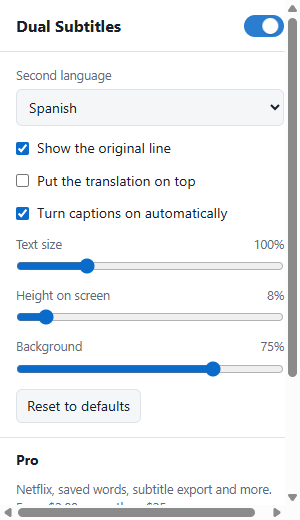
Click the extension's icon in the Chrome toolbar. Under "Second language" choose from more than 80 languages. That is the only setting you need.
3. Open a video with captions
Play any video that has captions, either ones the uploader wrote or YouTube's automatic ones. The extension switches captions on for you and draws the second line under the first. Both lines follow the same timing, so you can glance down to check a word without pausing.
Change how it looks
- Put the translation above or below the original.
- Hide the original line once you no longer need it.
- Adjust text size, height on screen and background darkness. Changes apply while the video plays.
When the second line does not appear
- The video has no captions. The extension translates the captions YouTube already has, so with none there is nothing to show.
- The popup says YouTube did not return a translation. YouTube refused the request for that video. Wait a minute and reload the tab.
- The extension is switched off. Check the toggle at the top of the popup.
Still stuck? See support.
Is it free, and is it private?
Showing two subtitle languages is free, with every display setting. A paid Pro plan adds saved words and subtitle export, and the free features do not depend on it. The extension collects nothing and sends nothing except requests to youtube.com. Details are in the privacy policy.